Concepts
Identity Management: Concepts & Approaches
What a login system has to provide, how pages become available or not per user, the real threat model, and roll-your-own vs. federated vs. hosted identity.
TL;DRThis series assumes you already have a working LAMP server — see Setting Up a Lightsail Web Server if you don’t yet.
Almost every dynamic site eventually has to answer one question on every request: who is this, and what are they allowed to see? That’s identity management — and it’s worth treating as its own subsystem rather than something you bolt onto each page as you write it. Get the shape right once and every page after it is a one-line check. Get it wrong and you’re fixing the same bug in twenty different files.
What an Identity System Has to Provide
Strip away the specific technology and a login system is really a short list of services:
- Signup and email verification — proving the account belongs to a real, reachable address before it can do anything.
- Login and logout — and “sign out everywhere,” not just this browser.
- Session management — the cookie is a pointer to server-side state, never the credential itself.
- Password / passkey reset — recovery when the primary credential is lost.
- Per-page access control — guest, member, and admin tiers, checked consistently.
- Abuse resistance — rate limiting, lockout, and an audit trail of security-relevant events.
- Self-service account controls — change password, review or revoke active sessions, delete the account.
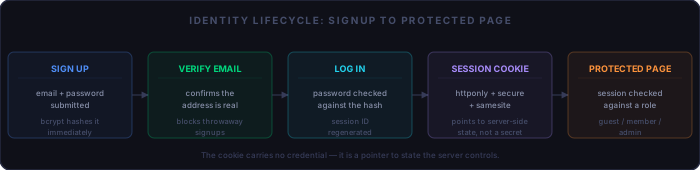
How Pages Become Available, or Not
The session is the single source of truth for who’s asking. The mistake
that causes real bugs isn’t the check itself —
if (empty($_SESSION['signed_in'])) is easy to write correctly once.
It’s writing that check by hand, on every page, where one missed
page is a silent security hole and one changed rule means editing files you
forgot existed.
The fix is a small registry: one place that maps a route to the role it requires, checked by one shared function every page calls at the top. Adding a page or changing its access level becomes a one-line edit in one file, not a search-and-replace across the codebase.
// includes/require-role.php
function require_role($role) {
  if ($role === 'admin' && empty($_SESSION['admin'])) {
    header('Location: /sign-in.php');
    exit;
  }
  if ($role === 'member' && empty($_SESSION['signed_in'])) {
    header('Location: /sign-in.php');
    exit;
  }
}

// at the top of any gated page
require_role('member');
Three tiers cover most sites: guest (public), member (signed in), and admin (elevated). That’s the shape Part 2 builds.
The Threat Model
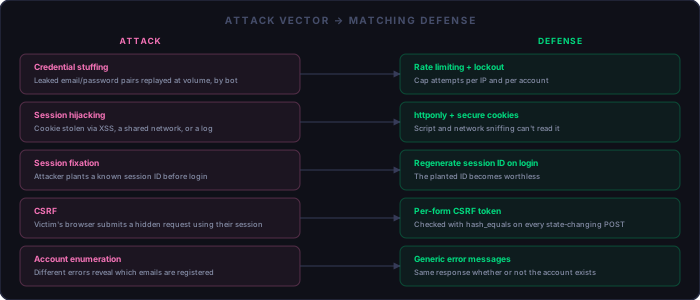
Take this seriously: a login form on the public internet is attacked from the hour it goes live, automatically, by bots that don’t care how small your site is. None of the following requires a targeted attacker — all of it is commodity tooling running at volume.
- Credential stuffing. An attacker replays email/password pairs leaked from an unrelated breach against your login form, at volume, via bot — betting that some fraction of your users reused a password. See OWASP’s Credential Stuffing Prevention Cheat Sheet.
- Brute force / password spraying. The same idea with guessed rather than leaked passwords — why rate limiting and account lockout exist at all. Same cheat sheet as above.
- Session hijacking. Stealing the session cookie — via XSS, a shared or compromised network, or a leaked server log — lets an attacker act as the user with no password needed at all. See OWASP’s Session Management Cheat Sheet.
- Session fixation. The attacker plants a known session ID before login, then rides it in once the victim authenticates — why regenerating the session ID on login matters, not just setting a cookie. Same cheat sheet as above.
- CSRF. A logged-in user’s browser is tricked into submitting a state-changing request — change password, transfer funds — to your site from a page they’re viewing elsewhere, riding their existing session. See OWASP’s CSRF Prevention Cheat Sheet.
- Account enumeration. A login or reset form that responds differently for “wrong password” versus “no such account” hands attackers a free list of valid targets. Covered in OWASP’s Authentication Cheat Sheet.
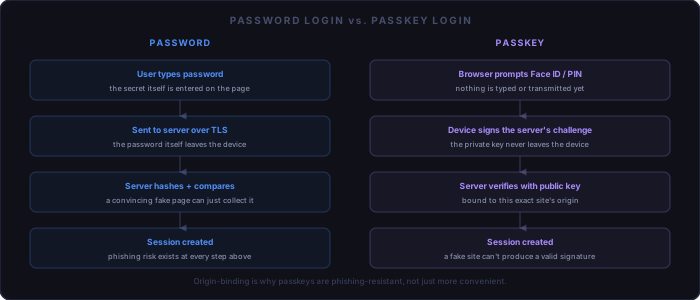
- Phishing. The one attack password-based auth structurally can’t stop — a convincing fake login page just collects the password, no exploit required. The concrete reason passkeys are phishing-resistant by design, covered below.
NIST’s current authentication guidance is worth reading once, even skimmed: it’s the source of the now-standard advice to stop forcing periodic password rotation and arbitrary complexity rules, and instead favor length and checking against known-breached password lists. See NIST SP 800-63B-4, Digital Identity Guidelines: Authentication and Authenticator Management.
Three Approaches, Compared
Roll your own
PHP sessions, MariaDB, bcrypt password hashing. Low effort, no new infrastructure, and it’s already what this site runs. You own every line, which is exactly the right size of security surface for a site like this one — small enough to actually review, unlike a framework's login stack.
Federated / social login
“Sign in with Google/GitHub/Apple” via OAuth. Low-to-medium effort — you write a client flow, not a credential store — and it delegates password security entirely to the provider. The tradeoff: your site now depends on that provider being up, and on the visitor already having an account there.
Hosted identity service
Amazon Cognito, Auth0, Clerk, and similar. Most “secure by default” option, but it's the heaviest to integrate — a new vendor, a cost line, and an SDK dependency — and a poor fit for a no-build-step, no-framework PHP site at this scale.
For this series: roll-your-own is the right default. It matches the site's existing conventions, stays simple at this scale, and is small enough to actually secure end to end — which Part 2 does.
Passwordless: Where Passkeys Fit
A passkey is a WebAuthn/FIDO2 credential: the browser generates a public/private keypair scoped to your site's exact origin. The private key never leaves the device — or its platform sync, such as iCloud Keychain or Google Password Manager. Your server only ever stores a public key, a credential ID, and a signature counter; there is no password equivalent to leak, because there is no shared secret at all.
The “no explicit login” behavior comes from conditional UI: the browser offers a saved passkey as an autofill suggestion the moment a username field is focused, so a return visit is a Face ID or Windows Hello tap, not typing a password. See the W3C WebAuthn Level 3 specification and the FIDO Alliance's passkeys overview.
The real complexity lives server-side: challenge/response nonces, verifying the signature counter to catch a cloned authenticator, and supporting multiple credentials per user (phone, laptop, security key). PHP has no WebAuthn support in core — a library is required. And not every visitor has a passkey-capable browser yet, so a fallback path can’t be dropped for a while. Given that, this series treats passkeys as an enhancement layer on top of the password-based system, not a replacement for it — Part 3's job, once Part 2's system exists to add it to.
What This Series Builds
Part 2 builds the system described above end to end: signup, verification, login, logout, bcrypt, CSRF tokens, session cookie flags, rate limiting, and the role registry. Part 3 adds WebAuthn on top of it for passwordless, near-invisible sign-in. Part 4 covers the different problem of authorizing machine clients — API keys, bearer tokens, and OAuth client-credentials — rather than browsers.
Checklist
Understand the service list:
  [ ] Signup, verification, login, logout, sign-out-everywhere
  [ ] Session is a pointer to state, not a credential
  [ ] Password/passkey reset and self-service account controls

Gate pages with a registry, not scattered checks:
  [ ] One shared require_role() function
  [ ] Three tiers: guest, member, admin

Know your threat model:
  [ ] Credential stuffing and brute force
  [ ] Session hijacking and fixation
  [ ] CSRF and account enumeration
  [ ] Phishing — the one password auth can't stop

Pick an approach:
  [ ] Roll-your-own for this series (PHP + MariaDB + bcrypt)
  [ ] Federated login as a lower-effort alternative
  [ ] Hosted identity service only at real scale/compliance need

Passkeys as an enhancement, not a v1 requirement:
  [ ] Conditional UI enables near-invisible re-authentication
  [ ] Origin-binding makes them phishing-resistant
  [ ] Still needs a password fallback during transition