Security
Identity Management: Adding Passkeys
Passwordless sign-in with WebAuthn: registering a passkey, conditional-UI autofill for near-invisible logins, and a fallback plan for devices that don't support it.
TL;DR
Part 1 covered what
passkeys are and why they resist phishing.
Part 2 built a
complete password-based system. This part adds WebAuthn on top of
that exact system — same members table, same session
code, same require_role() gate — without touching any of
it. A member can end up with a password, one or more passkeys, or both;
nothing here removes the password path.
What Changes in the Schema
A passkey is a credential that belongs to a member, not a replacement for
the member itself — and unlike a password, one member can reasonably
have several (a phone, a laptop, a security key), so it needs its own
table rather than a column on members. The actual
CREATE TABLE is Step 2 below; the shape is one row per
registered device, storing a public key and a signature counter —
never anything the device itself needs to keep secret.
Step-by-Step: Registering a Passkey
STEP 1 Install the library
lbuchs/webauthn is a small, dependency-light WebAuthn server
library — no attestation-chain framework to configure, no bundled UI.
That matches this site's existing composer footprint (see
.env Files & PHP Dotenv),
so it's the one used here. It has nothing to do with
Part 4's API
keys and bearer tokens — those are an unrelated mechanism that just
happens to live later in the same series, and don't need a bigger library
either.
composer require lbuchs/webauthn
If deploys ship files with something other than a plain
composer install on the server — a robocopy/scp script
that excludes vendor/ and composer.json/lock
to keep server-only dependencies off the wire, for instance — run
composer require directly on the server itself, the same way
any other server-only dependency gets installed there. Shipping the app
code without it produces a plain Class "lbuchs\WebAuthn\WebAuthn"
not found fatal the first time any passkey endpoint runs.
STEP 2 Create the passkey_credentials table
CREATE TABLE passkey_credentials (
  passkey_id     INT NOT NULL AUTO_INCREMENT,
  member_id      INT NOT NULL,
  credential_id  VARCHAR(255) NOT NULL,   -- base64url, from the authenticator
  public_key     TEXT NOT NULL,
  sign_count     INT NOT NULL DEFAULT 0,
  device_label   VARCHAR(100),
  created_at     DATETIME NOT NULL,
  last_used_at   DATETIME,
  PRIMARY KEY (passkey_id),
  UNIQUE KEY (credential_id)
);
UNIQUE KEY (credential_id) isn't optional here — sign-in
looks a credential up by this value alone, before it knows which member is
asking.
Part 2's
schema fix added that same kind of constraint to members
after the fact; this table gets it from the start.
STEP 3 Generate a registration challenge
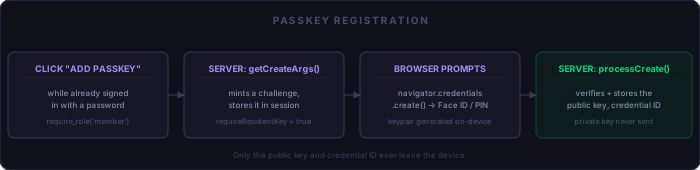
This endpoint only ever runs for someone already signed in with a password
— require_role('member') guards it like any other member
page:
// autoload MUST come before session_start() — see the note below the
// next code block for why
require_once __DIR__ . '/vendor/autoload.php';
session_start([/* httponly, secure, samesite */]);
require_once __DIR__ . '/includes/require-role.php';
require_role('member');

$rpId     = 'yoursitename.com';   // must exactly match the domain — no scheme, no port
// the 4th arg is base64url encoding — without it, challenges go to the
// browser in a "=?BINARY?B?...?=" format the WebAuthn JS API can't decode
$webAuthn = new lbuchs\WebAuthn\WebAuthn('Your Site Name', $rpId, null, true);

// the browser treats this as an opaque handle, not a display value —
// packing member_id into raw bytes is enough
$userId = hex2bin(str_pad(dechex($_SESSION['member_id']), 32, '0', STR_PAD_LEFT));

$createArgs = $webAuthn->getCreateArgs(
    $userId,
    $_SESSION['email'],
    $_SESSION['email'],
    60 * 4,   // seconds before the challenge expires
    true      // requireResidentKey
);

$_SESSION['webauthn_challenge'] = $webAuthn->getChallenge();

header('Content-Type: application/json');
echo json_encode($createArgs);
requireResidentKey = true is the one flag that matters most in
this whole article: it tells the authenticator to store the credential as a
discoverable one the browser can offer on its own later,
rather than a bare second factor that always needs a username typed first
before it knows which credential to check. Without it, the conditional-UI
sign-in in the next section doesn't work.
STEP 4 Verify the registration response and store the credential
require_once __DIR__ . '/vendor/autoload.php';
session_start([/* httponly, secure, samesite */]);
require_once __DIR__ . '/includes/require-role.php';
require_role('member');

$body = json_decode(file_get_contents('php://input'), true);

// CSRF check — same pattern as Part 2, just read from the JSON body instead of $_POST
if (!hash_equals($_SESSION['csrf_token'] ?? '', $body['csrf_token'] ?? '')) {
    http_response_code(403);
    exit;
}

$rpId      = 'yoursitename.com';
$webAuthn  = new lbuchs\WebAuthn\WebAuthn('Your Site Name', $rpId, null, true);
$challenge = $_SESSION['webauthn_challenge'] ?? null;
unset($_SESSION['webauthn_challenge']);

try {
    // the browser sends base64URL (- and _, no padding) — plain base64_decode()
    // silently mangles those characters instead of erroring, corrupting the data
    $result = $webAuthn->processCreate(
        \lbuchs\WebAuthn\Binary\ByteBuffer::fromBase64Url($body['clientDataJSON'])->getBinaryString(),
        \lbuchs\WebAuthn\Binary\ByteBuffer::fromBase64Url($body['attestationObject'])->getBinaryString(),
        $challenge,
        true,   // requireUserVerification
        true,   // requireUserPresent
        false   // failIfRootMismatch
    );
} catch (Throwable $e) {
    http_response_code(400);
    exit('Registration failed');
}

$hDB->insert_prepared(
    'INSERT INTO passkey_credentials
        (member_id, credential_id, public_key, sign_count, device_label, created_at)
     VALUES (?, ?, ?, ?, ?, NOW())',
    'issis',
    $_SESSION['member_id'],
    // store base64URL, matching what sign-in will send back for the lookup —
    // base64_encode() here and a base64URL string there would rarely match
    (new \lbuchs\WebAuthn\Binary\ByteBuffer($result->credentialId))->jsonSerialize(),
    $result->credentialPublicKey,
    $result->signatureCounter ?? 0,
    $body['label'] ?? 'Unnamed device'
);
Two easy-to-miss gotchas live in that snippet. First,
$_SESSION['webauthn_challenge'] holds the library's
ByteBuffer object directly, not a manually-encoded string.
PHP can serialize and unserialize arbitrary objects in the session just
fine — but only if the class is already autoloadable at the
exact moment session_start() decodes the session data.
That's why require_once .../vendor/autoload.php comes
before session_start() in every endpoint on
this page, not after. Get the order backwards and the class isn't known
yet when the challenge is unserialized, so PHP quietly substitutes a
useless __PHP_Incomplete_Class stub instead of a real
ByteBuffer — which then fails deep inside
processCreate() with a confusing Object of class
__PHP_Incomplete_Class could not be converted to string error, not
anything that looks like a session or ordering problem.
Second, everything the browser sends back — clientDataJSON,
attestationObject, the stored credentialId
— is base64URL, not standard base64: - and
_ instead of + and /, and no
padding. PHP's base64_decode() doesn't understand
base64URL and won't error on it either; it just silently produces
corrupted binary, so registration fails with a generic error and nothing
in the log points at the real cause. Decode with the library's own
ByteBuffer::fromBase64Url() instead, and encode the stored
credential ID the same way (jsonSerialize() on a
ByteBuffer) so it matches the base64URL string sign-in will
look it up by later.
STEP 5 Wire the browser side
WebAuthn's browser API works in raw ArrayBuffers; everything
crossing the network here is base64url text, so a small pair of conversion
helpers does the translation both ways:
function b64urlToBuf(b64url) {
  const raw = atob(b64url.replace(/-/g, '+').replace(/_/g, '/'));
  const buf = new Uint8Array(raw.length);
  for (let i = 0; i < raw.length; i++) buf[i] = raw.charCodeAt(i);
  return buf.buffer;
}

function bufToB64url(buf) {
  const bytes = new Uint8Array(buf);
  let str = '';
  for (const b of bytes) str += String.fromCharCode(b);
  return btoa(str).replace(/\+/g, '-').replace(/\//g, '_').replace(/=+$/, '');
}

async function registerPasskey(csrfToken) {
  const createArgs = await fetch('/passkey-register-begin.php').then(r => r.json());

  createArgs.publicKey.challenge = b64urlToBuf(createArgs.publicKey.challenge);
  createArgs.publicKey.user.id   = b64urlToBuf(createArgs.publicKey.user.id);

  const credential = await navigator.credentials.create(createArgs);

  await fetch('/passkey-register-finish.php', {
    method: 'POST',
    body: JSON.stringify({
      clientDataJSON:    bufToB64url(credential.response.clientDataJSON),
      attestationObject: bufToB64url(credential.response.attestationObject),
      csrf_token:        csrfToken,
    }),
  });
}
Step-by-Step: Signing In With a Passkey
STEP 1 Generate a sign-in challenge
Unlike registration, this endpoint is reachable by anyone — nobody's signed in yet, and it doesn't need to know who's asking:
// autoload before session_start() here too, for the same reason as registration
require_once __DIR__ . '/vendor/autoload.php';
session_start([/* httponly, secure, samesite */]);

$rpId     = 'yoursitename.com';
$webAuthn = new lbuchs\WebAuthn\WebAuthn('Your Site Name', $rpId, null, true);

$getArgs = $webAuthn->getGetArgs([]);   // no credential list — the browser finds its own

$_SESSION['webauthn_challenge'] = $webAuthn->getChallenge();

header('Content-Type: application/json');
echo json_encode($getArgs);
An empty credential list is what makes this a discoverable-credential (passkey) flow rather than a traditional WebAuthn second factor, which normally lists the specific credential IDs it's willing to accept for an already-known username. Here the browser, not the server, is the one that knows which passkey to offer.
STEP 2 Verify the assertion
require_once __DIR__ . '/vendor/autoload.php';
session_start([/* httponly, secure, samesite */]);

$body         = json_decode(file_get_contents('php://input'), true);
$credentialId = $body['credentialId'] ?? '';   // already base64URL from bufToB64url()

$q = 'SELECT member_id, public_key, sign_count
      FROM passkey_credentials WHERE credential_id = ?';
// ... prepare, bind, execute, fetch into $member_id, $public_key, $sign_count ...

if (!$found) {
    http_response_code(400);
    exit('Unknown passkey');
}

$rpId      = 'yoursitename.com';
$webAuthn  = new lbuchs\WebAuthn\WebAuthn('Your Site Name', $rpId, null, true);
$challenge = $_SESSION['webauthn_challenge'] ?? null;
unset($_SESSION['webauthn_challenge']);

try {
    // base64URL decode, same reasoning as registration above
    $webAuthn->processGet(
        \lbuchs\WebAuthn\Binary\ByteBuffer::fromBase64Url($body['clientDataJSON'])->getBinaryString(),
        \lbuchs\WebAuthn\Binary\ByteBuffer::fromBase64Url($body['authenticatorData'])->getBinaryString(),
        \lbuchs\WebAuthn\Binary\ByteBuffer::fromBase64Url($body['signature'])->getBinaryString(),
        $public_key,
        $challenge,
        $sign_count   // rejects outright if the reported count doesn't exceed this
    );
} catch (Throwable $e) {
    http_response_code(400);
    exit('Passkey sign-in failed');
}
STEP 3 Reuse Part 2's session code
This is the point of building passkeys as an addition rather than a parallel
system: once processGet() succeeds, the rest is identical to a
password login, including the blocked check:
// SELECT email, admin, blocked FROM members WHERE member_id = ?
// ... prepare, bind, execute, fetch into $email, $admin, $blocked ...

if ($blocked) {
    http_response_code(403);
    exit('Account blocked');
}

session_regenerate_id(true);
$_SESSION['signed_in']  = true;
$_SESSION['email']      = $email;
$_SESSION['member_id']  = $member_id;
$_SESSION['admin']      = $admin;
$_SESSION['csrf_token'] = bin2hex(random_bytes(32));

// $webAuthn->getSignatureCounter() — the new count, not the old $sign_count read
// from the DB above. Re-storing the old value would silently defeat clone
// detection on every future sign-in with this credential.
$newSignCount = $webAuthn->getSignatureCounter() ?? $sign_count;
// UPDATE passkey_credentials SET sign_count = $newSignCount, last_used_at = NOW() WHERE credential_id = ?

echo json_encode(['redirect' => '/topics-member.php']);
Nothing about CSRF, session fixation, or the blocked check needed to be re-derived here — a passkey sign-in produces the exact same session a password login does.
STEP 4 Wire conditional UI in the browser
On the sign-in page, the email input needs one attribute added, and a script that offers the passkey the moment that field is focused — not on a button click:
<input type="email" name="email" autocomplete="username webauthn">async function tryConditionalPasskey() {
if (!window.PublicKeyCredential?.isConditionalMediationAvailable) return;
if (!(await PublicKeyCredential.isConditionalMediationAvailable())) return;
const getArgs = await fetch('/passkey-signin-begin.php').then(r => r.json());
getArgs.publicKey.challenge = b64urlToBuf(getArgs.publicKey.challenge);
const credential = await navigator.credentials.get({
publicKey: getArgs.publicKey,
mediation: 'conditional',
});
const result = await fetch('/passkey-signin-finish.php', {
method: 'POST',
body: JSON.stringify({
credentialId: bufToB64url(credential.rawId),
clientDataJSON: bufToB64url(credential.response.clientDataJSON),
authenticatorData: bufToB64url(credential.response.authenticatorData),
signature: bufToB64url(credential.response.signature),
}),
}).then(r => r.json());
window.location = result.redirect;
}
document.addEventListener('DOMContentLoaded', tryConditionalPasskey);STEP 5 Confirm it's working
Test plan:
  [ ] Sign in with a password, register a passkey, sign out
  [ ] Revisit the sign-in page and focus the email field
  [ ] Confirm the browser offers the passkey as an autofill suggestion
  [ ] Confirm a single tap (no typing) signs you in
  [ ] Confirm the password field still works for a browser/device that lacks passkey support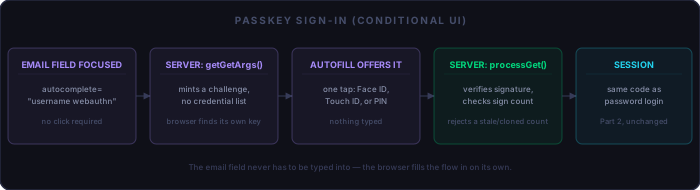
The Sign Counter and Clone Detection
Every time an authenticator produces a signature, it's supposed to
increment a counter and report the new value. A received count that
isn't strictly greater than what's stored is a signal that the same
credential answered twice — a cloned authenticator, or a replayed
assertion — and processGet()'s sixth argument above
rejects on exactly that condition.
The nuance worth knowing before it surprises you in testing: cloud-synced
passkeys — iCloud Keychain, Google Password Manager — commonly
report a counter that stays at 0 on every single use, since
the credential is shared across devices with no reliable central counter to
increment. That's precisely the kind of passkey most users will actually
have. A naive “reject if the count isn't strictly increasing”
rule would need to treat a steady 0 as the normal case, not as
suspicious — only a count that goes backward from a nonzero
value is a reliable signal.
Where You Save It Matters
The browser's own "save a passkey" dialog isn't a formality — it decides which browsers and devices can use that credential afterward. Save it to a single browser's own password manager and it's typically scoped to that browser (or that browser's synced account) only. Save it to the operating system's platform authenticator instead — Windows Hello, macOS's Keychain — and it's stored at the OS level, so any browser installed on that machine can use it: a passkey saved to Windows Hello from Chrome shows up as an autofill option in Firefox or Edge on the same PC too. A hardware security key is the most portable option of all, tied to neither a browser nor a machine.
The server has no visibility into which of these a member picked
— that choice happens entirely inside the browser's own dialog,
before navigator.credentials.create() ever resolves. It's
worth saying this up front on the registration page itself, so a member
who wants the passkey to work from any browser on their PC knows to
pick the platform option rather than "this browser only."
Fallback and Recovery
The password path built in Part 2 stays fully intact — not every browser or device supports passkeys yet, and this system never requires one. Lost every device with a passkey on it? The same password reset flow from Part 2 gets a member back in, after which they can register a new one.
Managing existing passkeys is a short list-and-delete page: show
device_label and last_used_at per row for the
signed-in member, with a button that runs
DELETE FROM passkey_credentials WHERE passkey_id = ? AND member_id = ?
— the member_id check matters, so one member can never
revoke another's credential by guessing an ID.
Security Notes
Two things worth being deliberate about. First, the relying party ID passed to the library has to match the site's exact origin — a mismatch here is a common, subtle implementation bug, not a theoretical one. Second, and sharper: passkey registration itself needs CSRF protection and an active member session, exactly as built above. Skip either one and a hijacked session — the same session-invalidation gap Part 2 flagged and never fully closed — could be used to silently plant a persistent passkey on an account, giving an attacker a way back in even after the stolen session cookie itself expires.
What This Still Doesn't Cover
- Attestation-chain verification — this build trusts the authenticator's self-reported key rather than verifying it against a manufacturer certificate chain, a deliberate scope line for most sites' threat models.
- Admin tooling — no page for an admin to view or revoke a member's passkeys, mirroring the same gap already present for password accounts.
Part 4 moves to a different problem entirely: authorizing machine clients instead of browsers.
Checklist
Registering:
  [ ] passkey_credentials table, UNIQUE KEY on credential_id
  [ ] require_role('member') — registration only runs for an already-signed-in member
  [ ] requireResidentKey = true, or conditional UI won't work later
  [ ] CSRF token checked on the finish-registration endpoint
  [ ] Registration page notes that the OS platform option, not a single browser's manager, makes it work everywhere on that device
  [ ] vendor/autoload.php required BEFORE session_start(), on every endpoint that reads or writes webauthn_challenge
  [ ] composer require lbuchs/webauthn run directly on the server if your deploy script doesn't sync vendor/

Signing in:
  [ ] Empty credential list in getGetArgs() — lets the browser find its own key
  [ ] autocomplete="username webauthn" on the email field
  [ ] Sign counter checked on every assertion; 0-on-every-use is normal for synced passkeys
  [ ] Exact same session-establishment code and blocked check as Part 2's password login
  [ ] clientDataJSON/attestationObject/authenticatorData/signature decoded as base64URL (ByteBuffer::fromBase64Url), not base64_decode()
  [ ] Stored credential_id encoded as base64URL too, matching what sign-in looks it up by

Fallback:
  [ ] Password sign-in still works, unconditionally
  [ ] Password reset is the recovery path for a lost passkey
  [ ] Revoking a passkey checks member_id, not just passkey_id

Known gaps, addressed on purpose:
  [ ] No attestation-chain verification, no admin-side passkey management